How to Integrate Your HVAC with Matter and Apple Home in Central Park
Central Park residents who want their HVAC to work seamlessly with Apple HomeKit need more than just a smart thermostat. Denver’s high-altitude, dry climate and rapid temperature swings demand systems that can respond instantly to both local weather and HomeKit automation. This guide shows you how to connect Matter-enabled HVAC hardware, configure Siri voice commands, and take advantage of Xcel Energy rebates for smart thermostats in Central Park. Xcel Energy smart thermostat rebates.
Why Central Park Homes Need Smart HVAC Integration
Denver’s semi-arid high-desert climate means humidity often drops below 20%, and daytime-to-nighttime temperature swings can exceed 30 degrees. Standard programmable thermostats struggle with these extremes, but Matter-enabled devices paired with Apple HomeKit can automatically adjust heating and cooling based on geofencing, weather forecasts, and occupancy sensors. Central Park’s newer builds often have modern wiring and strong Wi-Fi, making them ideal for Matter-over-Thread networks that keep devices responsive even when your main router fails. Getting a New Central Air System Installed in Your Lakewood Home.
Best Matter-Enabled Thermostats for Apple HomeKit in Denver
Not all smart thermostats work equally well in Colorado’s climate. The table below compares top HomeKit-compatible models, highlighting features that matter most for Denver’s altitude and dryness.
| Thermostat | Key Features | Denver Advantage |
|---|---|---|
| ecobee SmartThermostat Premium | HomeKit, Matter, built-in Alexa, air quality sensor | Monitors indoor humidity to prevent over-drying |
| Honeywell Home T9 | HomeKit, Smart Room Sensors, geofencing | Detects cold spots common in Central Park multi-story homes |
| Emerson Sensi Touch 2 | HomeKit, easy C-wire adapter, energy reports | Quick installation for retrofits without rewiring |
| Johnson Controls GLAS | HomeKit, air quality monitoring, predictive maintenance | Alerts you to filter changes before Denver’s dust season |
Setting Up Your C-Wire and Thread Network
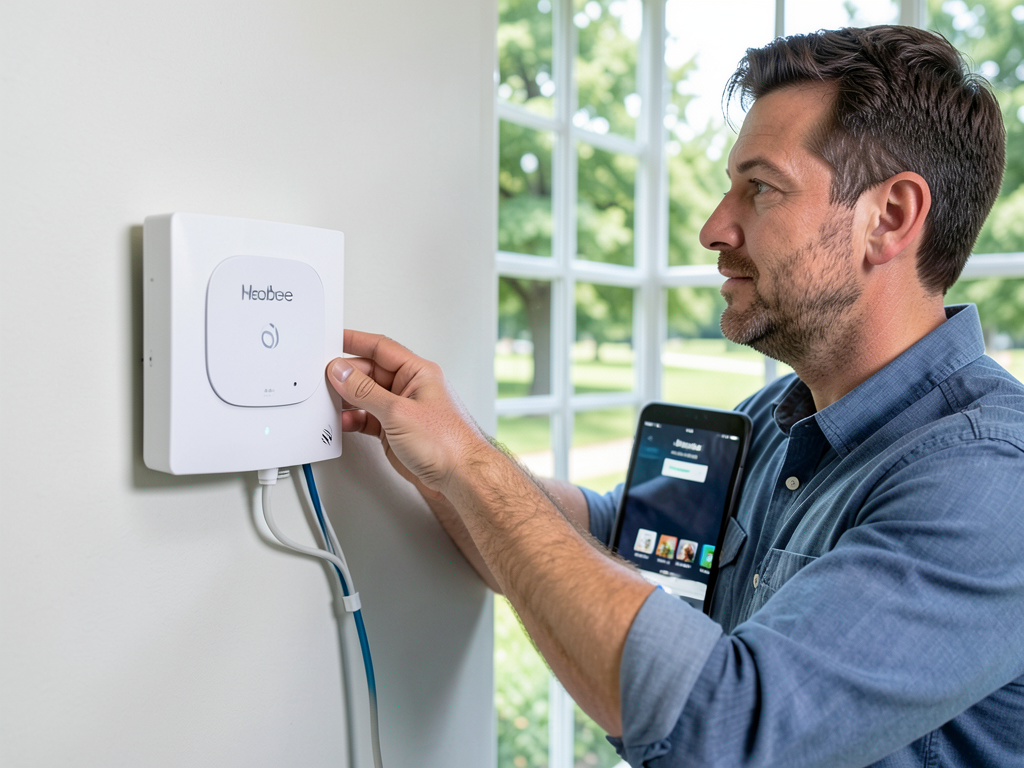
Most Matter-enabled thermostats require a C-wire (common wire) to provide continuous 24VAC power. Older Central Park homes may lack this wire, but a C-wire adapter can bridge the gap without invasive rewiring. Thread protocol, built into newer HomeKit devices, creates a low-power mesh network that keeps your HVAC responding even if your main Wi-Fi drops during a storm.
- Turn Off Power
Switch off the breaker to your HVAC system at the main panel.
- Remove Old Thermostat
Label each wire (R, W, Y, G) before disconnecting.
- Connect Adapter
Plug the C-wire adapter into the R and C terminals.
- Mount New Thermostat
Attach the backplate, connect labeled wires, and snap on the display.
- Power On and Test
Restore power, run a quick heat/cool cycle to confirm operation.
Using Siri Voice Commands for Denver Weather Swings
Apple’s Siri can control your HVAC through simple voice commands, which is useful when Denver’s weather shifts suddenly. Set up HomeKit “Scenes” to trigger multiple actions at once. For example, say “Hey Siri, warm up the house” to raise the thermostat 5 degrees and turn on a humidifier. Or “Hey Siri, cool down and save energy” to raise the setpoint by 3 degrees and activate ceiling fans.
Geofencing and Energy Savings in Central Park
HomeKit’s geofencing uses your iPhone’s location to adjust your HVAC automatically. When you leave Central Park for work, the system can switch to an energy-saving mode. When you return, it restores comfort. This feature pairs well with Xcel Energy’s “Savers Benefit” program, which offers bill credits for allowing minor thermostat adjustments during peak demand. Matter-enabled devices make these shifts seamless and invisible to you.
Professional Installation vs. DIY in Denver
While DIY installation works for simple swaps, Denver’s altitude and dry air introduce variables that pros handle daily. A certified technician will test combustion air intake for high-altitude furnaces, verify that Wi-Fi 6 routers can handle Matter’s bandwidth needs, and ensure Thread border routers (like Apple TV 4K or HomePod Mini) are placed for optimal coverage. They also check for Xcel Energy rebate eligibility before you buy. Emergency Furnace Repair for Denver Residents Dealing with a Frozen House.
Common HomeKit HVAC Issues in Denver and Fixes
Even with Matter, some issues crop up in Denver’s unique environment. Here are the most frequent problems and their solutions.
| Issue | Cause | Fix |
|---|---|---|
| Connection drops in winter | Static from dry air interferes with Wi-Fi | Add a Thread border router or relocate router away from metal ducts |
| Thermostat shows wrong temperature | Draft from old windows or attic leaks | Seal leaks, move thermostat away from vents |
| System won’t turn on | Low voltage from C-wire adapter mismatch | Verify adapter compatibility with your furnace control board |
Rebates and Incentives for Smart HVAC in Central Park
Xcel Energy offers up to $100 back for installing a qualified smart thermostat in Denver. To qualify, the device must be on Xcel’s approved list and installed by a licensed HVAC contractor. Some Matter-enabled models qualify automatically, but you must submit the rebate form within 60 days of installation. Combining this rebate with seasonal utility peak-time savings can cut your annual HVAC energy cost by 15-20%.
Integrating Humidifiers and Air Purifiers with HomeKit
Denver’s dry air often calls for a whole-home humidifier. Many modern units now support Matter, letting you control humidity from the Home app. Pair a smart humidifier with your HomeKit thermostat to maintain 30-40% indoor humidity automatically. Add a Matter-enabled air purifier to reduce dust from the high desert, and create a “Comfort Scene” that runs both when indoor air quality drops.
Security and Privacy with Smart HVAC
Matter devices encrypt all communication and do not rely on cloud servers for basic control. Even if your internet goes down, Thread-enabled thermostats keep running. For extra security, use two-factor authentication on your Apple ID and keep your Home Hub (Apple TV or HomePod) updated. This setup ensures your Denver home stays comfortable without exposing your data to third parties.
Call (720) 502-9511 for Expert HomeKit HVAC Installation
Integrating Matter and Apple Home with your HVAC in Central Park takes more than plugging in a device. Our NATE-certified technicians understand Denver’s altitude, dry air, and rapid temperature swings. We handle everything from C-wire installation to Thread network setup and Xcel Energy rebate paperwork. Call (720) 502-9511 today to schedule your smart HVAC consultation and keep your Central Park home comfortable year-round.
Frequently Asked Questions
Can I use HomeKit with my existing non-smart HVAC system?
Yes. A Matter-enabled smart thermostat can control most existing furnaces and AC units. You’ll need a C-wire or compatible adapter for power.
Will my smart thermostat work during a Denver blizzard?
Thread-enabled devices keep running even if your main Wi-Fi fails. As long as your furnace has power, the thermostat will control it locally.
How much can I save with geofencing in Central Park?
Most users see 10-15% annual savings by automatically adjusting temperature when the house is empty. Combine with Xcel rebates for even greater savings.
Do I need a professional to install a smart thermostat?
DIY works for simple swaps, but Denver’s altitude, wiring variations, and rebate paperwork make professional installation worthwhile for most homeowners.
What is Matter and why does it matter for my HVAC?
Matter is a universal smart home standard that ensures your devices work together, even across brands. For HVAC, it means your Apple HomeKit thermostat will reliably control your furnace or heat pump without compatibility headaches. For more information, visit ecobee SmartThermostat Premium.
{
“@context”: “https://schema.org”,
“@type”: “BlogPosting”,
“headline”: “How to Integrate Your HVAC with Matter and Apple Home in Central Park”,
“description”: “Learn how to connect your HVAC to Matter and Apple Home in Central Park. Expert Denver installation, Siri voice control, and energy rebates for smart home automation.”,
“wordCount”: 1205,
“datePublished”: “2026-06-07T06:05:00.000Z”,
“dateModified”: “2026-06-07T06:05:00.000Z”,
“inLanguage”: “en-US”,
“mainEntityOfPage”: {
“@type”: “WebPage”,
“@id”: “https://fortresshvacdenver.com”
},
“publisher”: {
“@type”: “LocalBusiness”,
“name”: “Fortress HVAC Denver”,
“url”: “https://fortresshvacdenver.com”
},
“author”: {
“@type”: “Organization”,
“name”: “Fortress HVAC Denver”,
“url”: “https://fortresshvacdenver.com”
},
“image”: {
“@type”: “ImageObject”,
“url”: “https://fortresshvacdenver.com/wp-content/uploads/2026/03/how-to-integrate-your-hvac-with-matter-and-apple-h-1.png”
}
}
{
“@context”: “https://schema.org”,
“@type”: “HVACBusiness”,
“name”: “Fortress HVAC Denver”,
“url”: “https://fortresshvacdenver.com”,
“address”: {
“@type”: “PostalAddress”,
“addressLocality”: “Denver”
},
“areaServed”: {
“@type”: “City”,
“name”: “Denver”
}
}
{
“@context”: “https://schema.org”,
“@type”: “FAQPage”,
“mainEntity”: [
{
“@type”: “Question”,
“name”: “Can I use HomeKit with my existing non-smart HVAC system?”,
“acceptedAnswer”: {
“@type”: “Answer”,
“text”: “Yes. A Matter-enabled smart thermostat can control most existing furnaces and AC units. You’ll need a C-wire or compatible adapter for power.”
}
},
{
“@type”: “Question”,
“name”: “Will my smart thermostat work during a Denver blizzard?”,
“acceptedAnswer”: {
“@type”: “Answer”,
“text”: “Thread-enabled devices keep running even if your main Wi-Fi fails. As long as your furnace has power, the thermostat will control it locally.”
}
},
{
“@type”: “Question”,
“name”: “How much can I save with geofencing in Central Park?”,
“acceptedAnswer”: {
“@type”: “Answer”,
“text”: “Most users see 10-15% annual savings by automatically adjusting temperature when the house is empty. Combine with Xcel rebates for even greater savings.”
}
},
{
“@type”: “Question”,
“name”: “Do I need a professional to install a smart thermostat?”,
“acceptedAnswer”: {
“@type”: “Answer”,
“text”: “DIY works for simple swaps, but Denver’s altitude, wiring variations, and rebate paperwork make professional installation worthwhile for most homeowners.”
}
},
{
“@type”: “Question”,
“name”: “What is Matter and why does it matter for my HVAC?”,
“acceptedAnswer”: {
“@type”: “Answer”,
“text”: “Matter is a universal smart home standard that ensures your devices work together, even across brands. For HVAC, it means your Apple HomeKit thermostat will reliably control your furnace or heat pump without compatibility headaches. For more information, visit ecobee SmartThermostat Premium.”
}
}
]
}
{
“@context”: “https://schema.org”,
“@type”: “HowTo”,
“name”: “How to Install a C-Wire Adapter”,
“step”: [
{
“@type”: “HowToStep”,
“position”: 1,
“name”: “Turn Off Power”,
“text”: “Switch off the breaker to your HVAC system at the main panel.”
},
{
“@type”: “HowToStep”,
“position”: 2,
“name”: “Remove Old Thermostat”,
“text”: “Label each wire (R, W, Y, G) before disconnecting.”
},
{
“@type”: “HowToStep”,
“position”: 3,
“name”: “Connect Adapter”,
“text”: “Plug the C-wire adapter into the R and C terminals.”
},
{
“@type”: “HowToStep”,
“position”: 4,
“name”: “Mount New Thermostat”,
“text”: “Attach the backplate, connect labeled wires, and snap on the display.”
},
{
“@type”: “HowToStep”,
“position”: 5,
“name”: “Power On and Test”,
“text”: “Restore power, run a quick heat/cool cycle to confirm operation.”
}
],
“image”: “https://fortresshvacdenver.com/wp-content/uploads/2026/03/how-to-integrate-your-hvac-with-matter-and-apple-h-1.png”
}
{
“@context”: “https://schema.org”,
“@type”: “BreadcrumbList”,
“itemListElement”: [
{
“@type”: “ListItem”,
“position”: 1,
“name”: “Home”,
“item”: “https://fortresshvacdenver.com”
},
{
“@type”: “ListItem”,
“position”: 2,
“name”: “Blog”,
“item”: “https://fortresshvacdenver.com/blog”
},
{
“@type”: “ListItem”,
“position”: 3,
“name”: “How to Integrate Your HVAC with Matter and Apple Home in Central Park”
}
]
}
{
“@context”: “https://schema.org”,
“@type”: “Service”,
“serviceType”: “HVAC”,
“provider”: {
“@type”: “LocalBusiness”,
“name”: “Fortress HVAC Denver”,
“url”: “https://fortresshvacdenver.com”
},
“areaServed”: {
“@type”: “City”,
“name”: “Denver”
},
“description”: “Learn how to connect your HVAC to Matter and Apple Home in Central Park. Expert Denver installation, Siri voice control, and energy rebates for smart home automation.”
}